Köpir means “bridge” in Kazakh
The bridge between clinic and lab
A CRM for dental laboratories, made by a dental technician. Work orders, stages, try-ins and reconciliation with clinics — in one place, from your phone or tablet.
The clinic portal is free.
Work order #128
Modeling
Ivanova A. A.
Zirconia crowns · 2 units · “Example Dent” clinic
Due: Fri, 14:00
To the clinic: “Order #128. Ivanova A. A., crowns — scans in progress”
Sound familiar?
“Where’s my order?”
The paper work order is on someone’s desk, and the clinic is calling for the third time today.
Orders from five places
Courier, WhatsApp, email, scanners — and all of it has to be merged into one queue by hand.
Try-ins and corrections get lost
A case went out for try-in and came back — where it is now and what to fix, only one person remembers.
Month-end reconciliation
Recounting orders for each clinic in the evening, with a calculator and arguments over the totals.
How it works
One path for every case — from order to delivery
1
An order comes in
A paper order from a courier, a photo in a messenger, an email or scans from Shining 3D and Dentsply Sirona — everything goes into one card.
2
The case moves through stages
Plaster, scanning, modeling, try-in, ceramics. A technician changes the status with one tap from a phone or the shared tablet.
3
The clinic stays informed
The clinic administrator sees in the portal where the case is and when it’s ready. Fewer phone calls.
4
Delivery and reconciliation
A printed order with one click, totals for each clinic and a reconciliation statement — no manual recounting.
Try it yourself
Pass a case on — like a technician in Köpir
Drag cards between stages with your mouse — and see what the clinic sees at that moment. On a phone, press and hold a card. This is a demo with made-up data.
New case
Modeling
Try-in
Ceramics
Ready for delivery
Sent to clinic
№ 201
Akhmetov B.
Zirconia crown × 2
№ 202
Kim E.
Veneer × 4
№ 203
Ivanova A.
Bridge × 3
Drag any card to another stage
This is what Köpir looks like
Real screens, not marketing pictures
Captured in a working lab. Names, clinics and amounts have been changed.
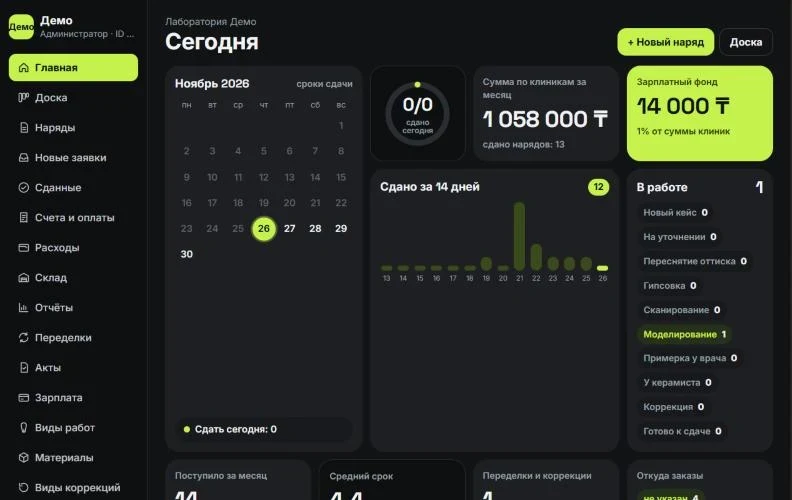
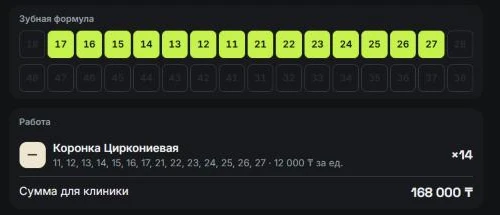
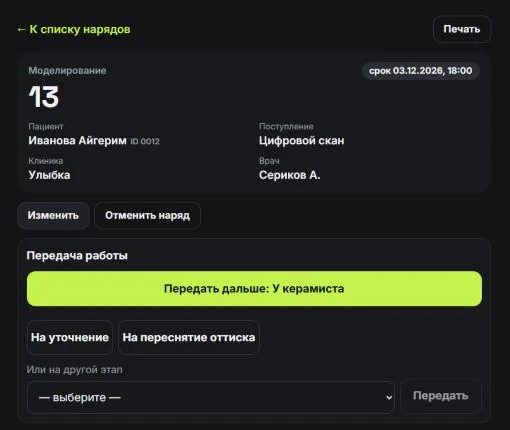
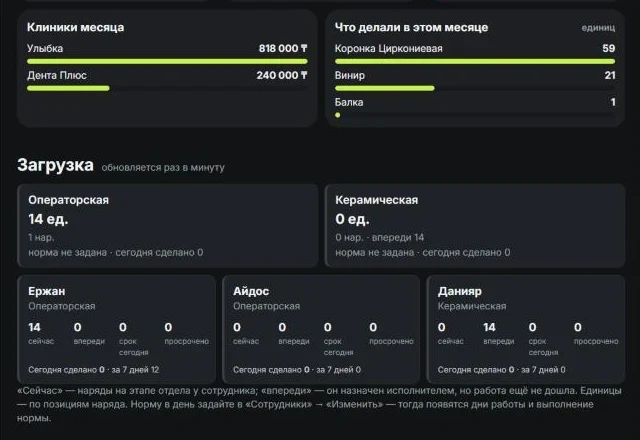
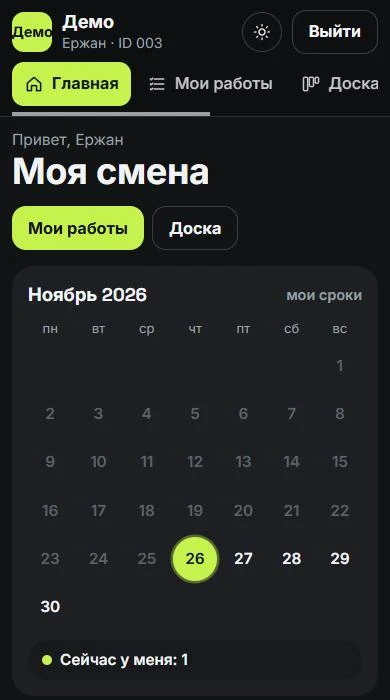
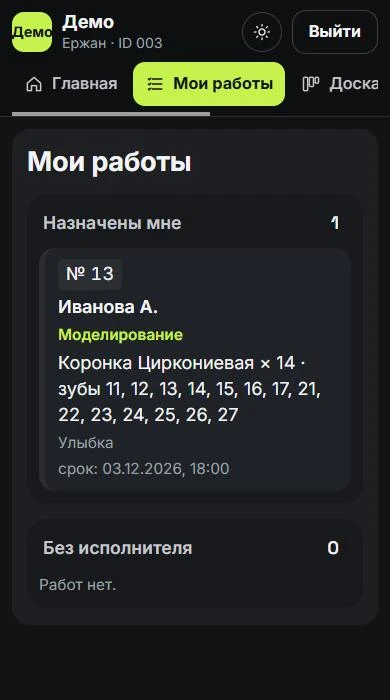
Technician account
Every technician has their shift on their phone
Log in with a personal ID and PIN. Technicians see only their own cases, deadlines and monthly earnings — and pass work on straight from their phone.
Features
Not just a board — the whole lab in one place
From work order to cost price: everything that’s now scattered across notebooks, spreadsheets and chats.
Live stage board
Cases move through stages on everyone’s screens at once, without reloading. Up to 8 custom stages for your lab.
Department tablet with PIN
A shared tablet in the operators’ room: technicians confirm every action with their PIN. You can see who passed the case and when.
Printed orders with QR
An A4 sheet — two copies with a cut line: “for work” and “for the lab”. The QR code opens the order card on a phone.
Tooth chart
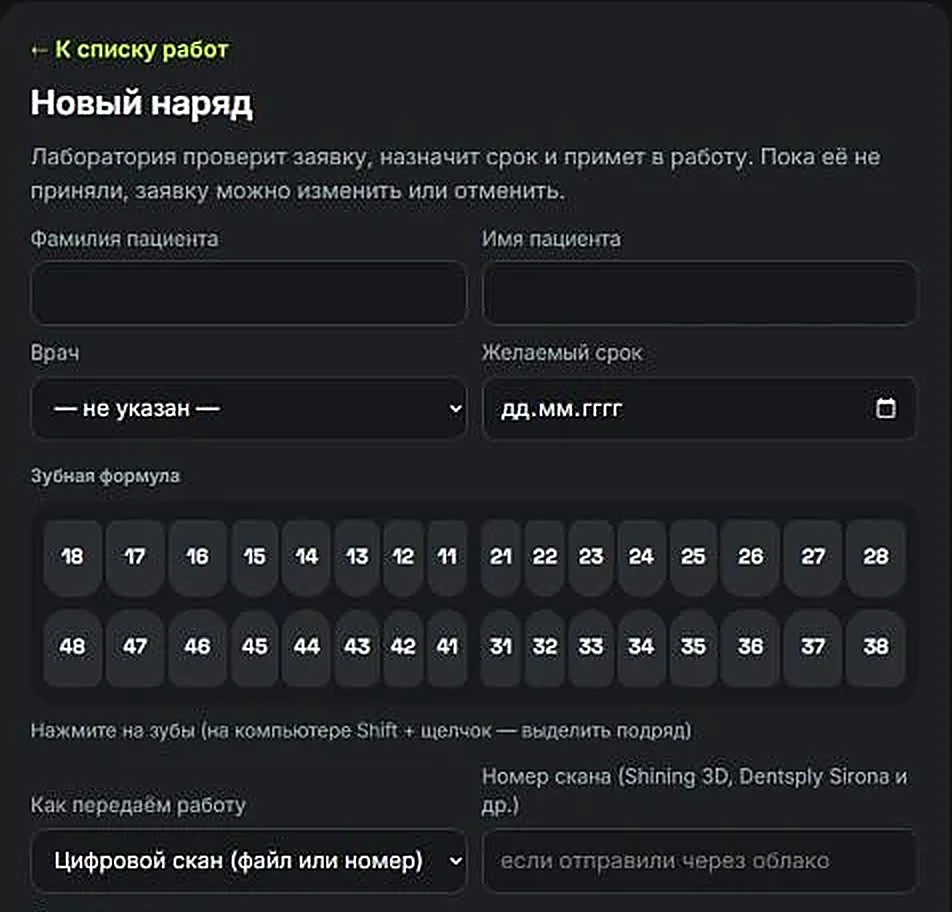
Pick the teeth, restoration type, material and VITA shade — the order items are assembled automatically.
Remakes under control
Every correction and remake with a reason and who’s responsible: doctor, impression, technician, material. A report shows what it costs.
Inventory and cost price
Receipts, issuing to departments, “time to reorder”. Cost price of every case: materials, technician pay, overhead.
Invoices and reconciliation
An invoice is created automatically when a case is delivered. Payments, clinic debts, reconciliation statements — with Excel export.
Technician pay
Output is credited automatically for every delivered case at personal rates. Technicians see their monthly earnings.
Activity log
Who changed a price, cancelled an order or cancelled a payment — recorded forever. Entries can’t be edited.
Everyone has their own screen
Everyone sees only what they need
Owner and administrator
The whole lab: deadlines, workload, finances, inventory, remakes. A phone notification for every new request from a clinic.
Technician
Only their own cases and monthly earnings. Log in from a phone with an ID and PIN, get notified when assigned to a case.
Accountant
Invoices, payments, expenses, payroll and statements. Doesn’t touch orders or settings.
Clinic
Requests with files, status of their own cases, invoices and reconciliation. Without the lab’s internal prices or staff.
For clinics
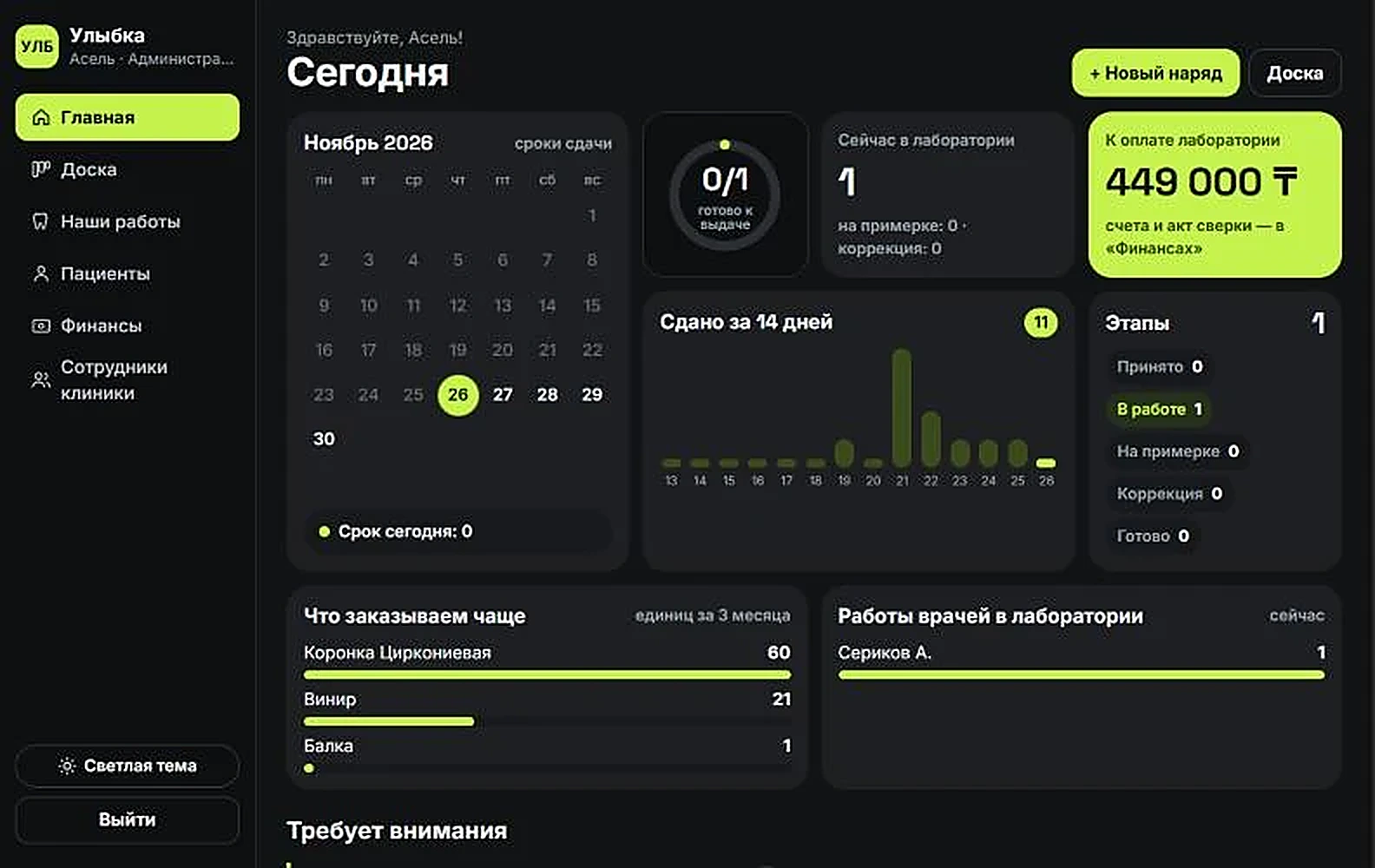
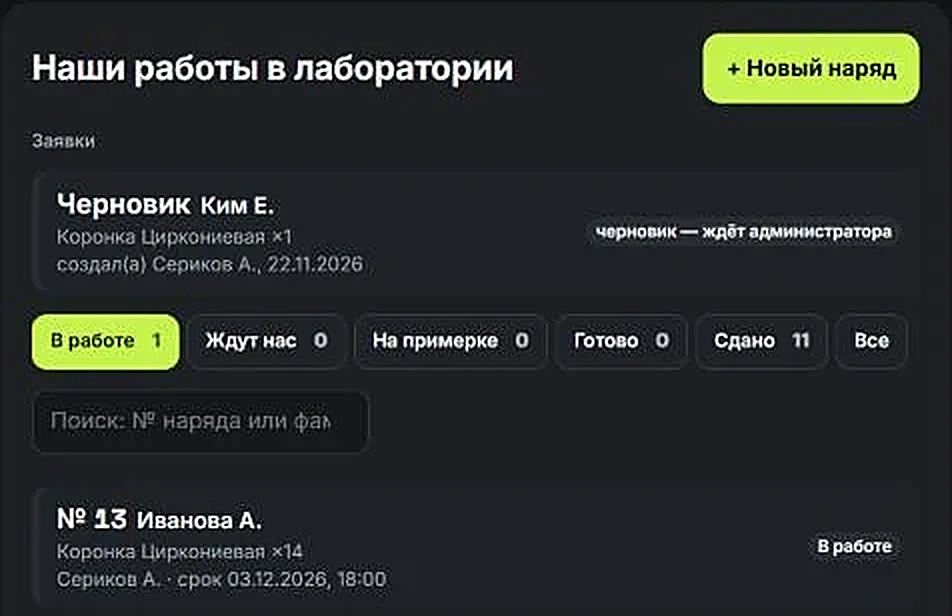
The clinic portal is free
The clinic sends an order in a few clicks and sees the status of every case. Connecting a clinic to the lab takes a couple of minutes.
- Case status without calling the lab
- Requests to the lab with a tooth chart and scan files
- Invoices, balance and reconciliation — for the clinic administrator
Coming soon: Köpir for dental clinics — a full clinic CRM connected directly to the lab
Notebook and Excel vs Köpir
| Task | Notebook, Excel, WhatsApp | Köpir |
|---|---|---|
| Where the case is now | Ask everyone one by one | Visible on the board in a second |
| Orders from different places | Courier, messenger, email — by hand into a notebook | One order card; the clinic can send a request itself |
| Try-ins and corrections | One person remembers | Reason, stage and history in the order |
| Reconciliation with a clinic | An evening with a calculator | A reconciliation statement for any period in a few clicks |
| Technician pay | Manual recount at month-end | Credited automatically for every delivered case |
| What a case really costs | Unknown | Cost price and markup by work type |
Do the math
How much time goes into searching and calling
That’s roughly, per month
15 h
of working time — about 2 days of 8 hours
We count 22 working days a month. The numbers are yours — enter your own.
Your data is protected
Your orders, prices and patients are yours alone
Every lab is separate
A lab sees only its own data. This rule is built into the database itself, not just the interface.
Even we can’t see your data
The Köpir team sees only your plan and overall activity — no orders, patients, prices or finances.
Minimum patient data
Only first and last name. On shared screens — “Ivanov A.”, the full name only in the order card.
PIN and audit log
PINs are stored only in encrypted form; access is locked after 5 wrong attempts. Important actions are recorded in a log.
Training
You can get the hang of it in one working day
Short videos for every action — open, watch for a minute, do it. No thick manuals.
How to create an order
How to change stages and mark try-ins
How to connect a clinic
How to print an order and reconcile
And if anything is unclear — message us on WhatsApp. Dental technicians will answer, not a call center.
Like an app
Köpir on your phone’s home screen — no App Store
Open Köpir in your browser and tap “Install” — an icon appears, the CRM opens full screen and notifications arrive just like from a regular app.
Getting started
Working in Köpir in just 3 days
- 1
We set up
Stages, work types, prices, clinics and staff — together with you.
- 2
We train
Short videos and a live walkthrough with your technicians and administrator.
- 3
You’re live
New orders go straight into Köpir. We’re available on WhatsApp.
Who makes Köpir
Köpir is made by a team of dental technicians
Every day we model, mill and print, manage orders, send cases out for try-ins and reconcile with clinics. Köpir grew out of our own work: we built the system we were missing ourselves, and we’re running it in a real lab.
That’s why stages, try-ins and orders in Köpir work the way technicians actually work — and we test every new improvement on ourselves first.
What’s next
Köpir grows every week
We use Köpir ourselves every day — so it won’t stand still. Here’s what’s already there and what’s coming.
Live now
- Stage board and work orders
- Printed orders with QR
- Inventory and cost price
- Invoices, statements and payroll
- Clinic portal and requests
- Lab notifications
- Install on your phone
In progress
- Moving data to servers in Kazakhstan
- Notifying clinics when cases are ready
Coming soon
- Köpir for dental clinics
- Apps on Google Play and the App Store
- A desktop app
Planned
- E-invoices (ESF and EAVR) straight from the CRM
- exocad integration
- WhatsApp notifications
Launching soon
Become one of the first labs
The first labs get special terms: 14 days free to get started, then a founding-customer price. Our team will help you set everything up, move your current cases over and train your staff.
Frequently asked questions
Where is patient data stored?
Each lab sees only its own orders. Before launch, the data is moving to servers in Kazakhstan.
What does Köpir run on?
Right now — in the browser on a phone, tablet or computer, nothing to install. Apps for computer and phone are coming soon.
Does the clinic have to pay?
No, the clinic portal for working with the lab is free. We’re also preparing a separate CRM for clinics — more on that later.
Can I take my data with me?
Yes, at any time and free of charge. If a payment is late, your data isn’t deleted.
How do I pay?
By invoice to our sole proprietorship, via bank transfer. Closing documents are provided.
Who helps us get started?
Our team. We’ll set up stages and work types for your lab, move your current orders over, connect your clinics and train your staff. After that — support on WhatsApp from people who work as technicians themselves.